
Ring Motion Settings Explained, and the Order That Cuts Notifications
What each Ring motion setting changes, from Motion Zones and sensitivity to Smart Alerts, Motion Frequency and snoozes, which doorbells and cameras have which, and the order we would change them in when the phone will not stop buzzing.
What to know
- Ring Alerts come from the doorbell button, Motion Alerts from movement, and Smart Alerts are Motion Alerts filtered to a person, package, or vehicle. All three reach your phone.
- Motion Warning is not a notification to you. The device says out loud to the visitor: "Hi, you are currently being recorded." It is available on select doorbells and cameras, needs at least one Motion Zone, and its volume cannot be adjusted on any Ring device.
- Motion Zones change the shape of what the device watches; the sensitivity slider changes how far into that shape it reacts. Lowering sensitivity reduces the detection range and, in Ring's words, helps decrease false alerts.
- Motion Frequency exists only on battery devices. On Regularly and Periodically the device stops watching for a while after each alert, which saves battery and can miss a second visitor.
- Snoozing motion alerts, globally, per device or on a Motion Schedule, leaves recording on; the two snoozes keep Doorbell Rings and Priority Alerts on, and a running schedule blocks the manual toggle.
Ring uses four different words for things that arrive in four different ways, and one of them never arrives at all. A Ring Alert means somebody pressed the doorbell button. A Motion Alert means the device saw movement. Smart Alerts are Motion Alerts narrowed to a person, a package or a vehicle. And Motion Warning never touches your phone: it is a spoken announcement the device plays out loud to whoever is standing in front of it.
These settings are for Ring doorbells and cameras, and which ones a device shows depends on the model and how it is powered. Ring describes Motion Frequency and Advanced Motion Detection as battery settings, and Motion Warning as a feature of select doorbells and cameras, so an option missing on your device is not a fault. The Ring Alarm Motion Detector is a different product: a sensor in the Ring Alarm system with its own settings, and nothing here applies to it.
For a phone that will not stop buzzing, this is the order we would use: draw the Motion Zone first, then pull in the sensitivity, then switch on Smart Alerts, and only then touch Motion Frequency.
The four things called an alert
The top of a device's screen in the alert settings has four toggles: Ring Alerts, Motion Detection, Motion Alerts and, on compatible devices, Motion Warning. Motion Detection is the master switch for detecting and recording motion at all. Two of the others decide what reaches your phone:
- Ring Alerts exist on doorbells only. On means you are told when someone rings the doorbell.
- Motion Alerts exist on doorbells and cameras. On means you are told when the device detects motion.
Two more get called alerts even though they behave differently:
- Smart Alerts filter Motion Alerts down to a specific kind of movement. They still land on your phone.
- Motion Warning sends nothing to your phone. It speaks to the person outside.
Alerts and recording are separate switches, and recording needs a subscription. A device can tell you something moved without keeping the video of it, and it can keep the video without telling you anything.
Motion Warning talks to your visitor, not to you
Motion Warning is a voice announcement that plays on the device when motion is detected. It says: "Hi, you are currently being recorded."
That is all it does.
What Motion Warning needs, and where to find it:
- Set it up under the Smart Responses tile for the device. On compatible devices it also appears among the toggles at the top of the device screen.
- It needs at least one Motion Zone defined first. Without a zone there is nothing for it to respond to.
- Ring offers it on select doorbells and cameras and no longer lists which; the Smart Responses tile on your device shows whether yours has it.
- The volume cannot be adjusted on any device.
- It can be tied to camera modes, so it switches itself on or off when the system goes to Home, Away or Disarmed. That automation needs a compatible subscription.
If you work from home, weigh the fixed volume before switching this on. The announcement plays to every visitor at the door and is audible inside the house as well, including while you are on a call.
Motion Zones: where the device looks
A Motion Zone decides which part of the view counts: motion inside it is detected and recorded, and Ring names the road, flags and windchimes as things to leave out.
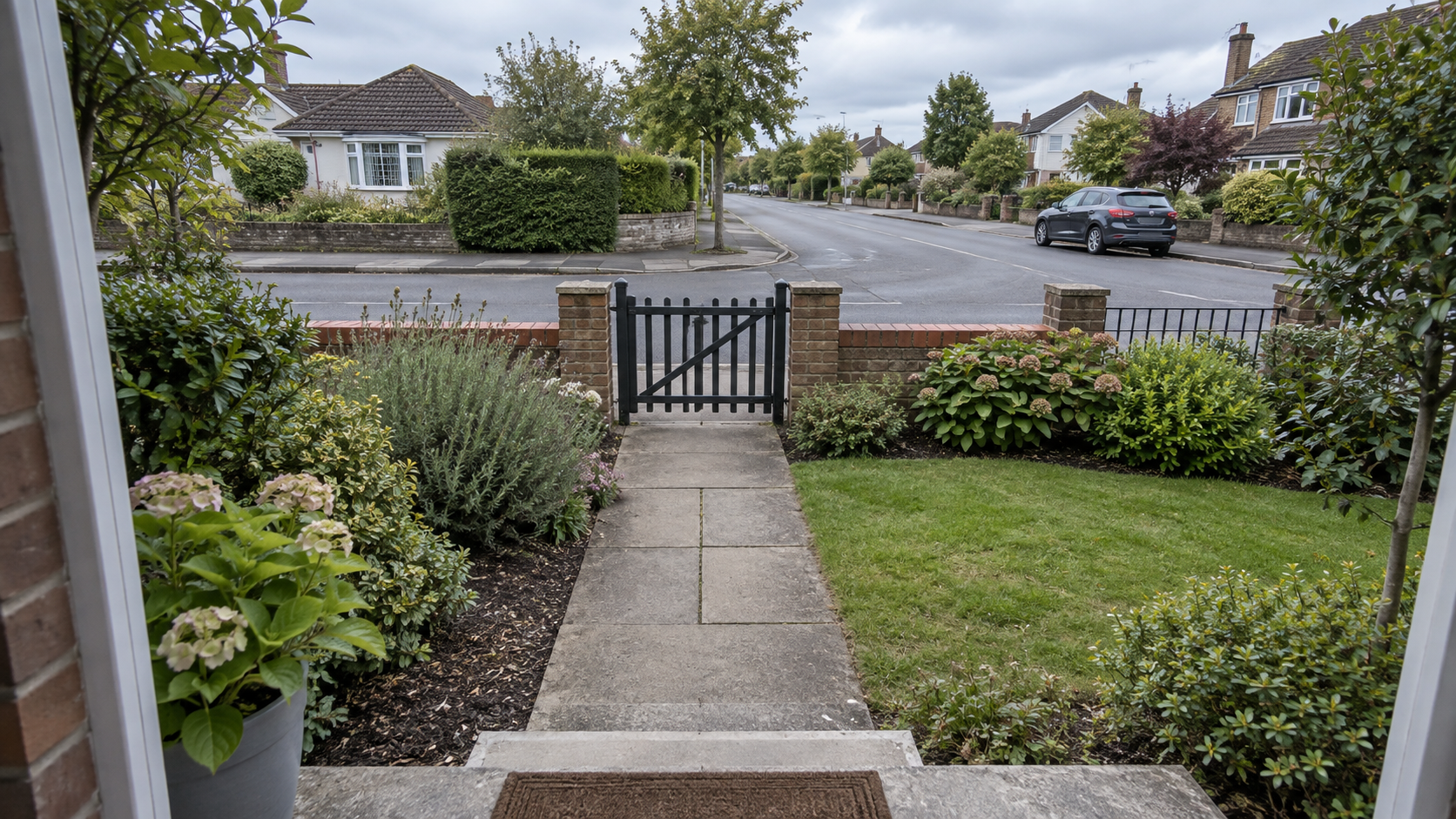
Change the zone first; it has the largest effect. A zone that includes a public sidewalk will trigger all day no matter what else you adjust, because the movement is real and the device is doing what it was told.
Zones also gate other features. Motion Warning needs at least one. Vehicle detection works inside Motion Zones or Bird's Eye Zones. With the zone right, the other settings have less to do.
Ring gives no maximum number of zones per device. How much of the street a zone can cover in the first place depends on the field of view of your model, which differs between doorbells and cameras.
Privacy Zones are not a notification tool. They black out part of the picture, and Ring says motion behind a Privacy Zone can still be detected and recorded, so a Privacy Zone drawn over the neighbor's driveway silences nothing. Where they sit in the frame is covered in how far a Ring camera sees.
Motion Sensitivity: how far it looks
The Motion Sensitivity slider adjusts the detection range, and the maximum range varies by device type.
Turning the slider down shrinks the detection range, and Ring says that helps decrease false alerts.
Zones and sensitivity do different jobs. A zone changes the shape of what the device watches. Sensitivity changes how far into that shape it reacts. If the alerts come from the right direction but from too far away, lower the sensitivity. If they come from the wrong direction, no amount of sensitivity will help; redraw the zone.
Motion Frequency: the battery trade
Motion Frequency exists only on battery-powered devices. It trades responsiveness against how often you recharge.
- Frequently. Shortest battery life. Motion detection stays active continuously.
- Regularly. Medium battery life. Detection takes a short break after each motion alert.
- Periodically. Maximum battery life. Detection takes a longer break after each alert.
On Regularly and Periodically the device stops watching for a while after it reports something, so a second visitor arriving soon after the first may not be recorded. That is a reasonable price on a quiet side entrance and a poor one on a front door.
Battery devices also have Advanced Motion Detection under Advanced Settings; Ring describes it as the way to get the most accuracy out of a battery device's motion detection. If a battery doorbell is missing events or triggering on nothing, we would check that before touching the zones again.
Turning frequency down is also one of the few settings that extends the time between charges, which is covered in what drains a battery.
Smart Alerts: person, package, vehicle
Smart Alerts are the setting to reach for when the complaint is too many notifications. The device alerts on a recognized kind of movement instead of any movement, which Ring says focuses the alerts on human activity and reduces notifications from other motion sources.
There are three, and each has a different device list:
- Person Detection. Available on all cameras and doorbells.
- Vehicle Detection. Supported on the 30 models Ring lists, and it works inside your selected Motion Zones or Bird's Eye Zones.
- Package Alerts. Available on all doorbells except the Peephole Cam and the Peephole Cam 2K, and it watches a designated Package Zone rather than a motion zone.
All three need what Ring calls a compatible subscription, without naming the plan tier. The plans have been renamed before, so check the plan comparison in the app against the feature you want rather than relying on a tier name.
Package Alerts are the one to set up if you are at home all day. The alert you want is not "something moved at the front of the house," which you can hear through the door anyway. It is "the thing you have been waiting for has arrived," and that is a different alert with a different zone behind it.
Snoozing without going dark
There are three ways to stop motion notifications for a while, and all three leave the recording running (provided you have the subscription that recording needs).
- Global Snooze (Alerts Snooze in the app) pauses Motion Alerts across all your devices at once.
- Per-device snooze does the same for a single camera or doorbell.
- Motion Schedules are the standing version of the snooze: a recurring window, per device, in which Motion Alerts are off and recording carries on. Find them under Device Settings, Motion Settings, Motion Schedules.
Both snoozes leave Doorbell Rings and Priority Alerts on. For Motion Schedules, Ring does not repeat that, but a schedule only touches the Motion Alerts switch, so our reading is that the door still rings. Snoozing a noisy camera through an afternoon of meetings does not mean missing someone at the door.
While a schedule has Motion Alerts off, the toggle cannot be switched back on by hand without canceling the schedule. If you are home all day, that decides which tool you want. A schedule suits a yard camera that fires during the same working hours every weekday; the snooze suits the one afternoon it matters. Put a schedule on the doorbell itself and you have built a daily window in which motion on the step goes unannounced, by design.
Why you still get too many notifications
If the alerts keep coming after you changed settings, check the order you changed them in. Ring does not prescribe a sequence (the app offers a Motion Wizard instead). This is the order we would use, because each setting narrows what the one before it lets through, and working out of sequence means fighting a setting you have not fixed yet:
- Motion Zone. Cut out the sidewalk, the road, the neighbor's driveway. Nothing downstream can undo a zone that includes a public thoroughfare.
- Sensitivity. Pull the range in until the far edge of the zone stops firing.
- Smart Alerts. With the zone right, filtering to people rather than any motion cuts down what is left.
- Motion Frequency last, and only on battery devices. This one costs you coverage, so use it after the others.
Before you conclude a setting is broken: turning Motion Alerts off stops the notifications, not the recording, so a quiet phone does not mean an empty event history. What gets recorded and how long it is kept is a separate question with a separate set of controls.
Sources
Everything above comes from Ring's own support articles below, accessed in September 2026. How we research explains the approach.
- Ring Help, "Managing alerts for Ring doorbells and cameras" (the four toggles, Alerts Snooze for all devices and per device, Doorbell Rings and Priority Alerts staying on)
- Ring Help, "Set up Motion Warning for compatible devices" (the announcement, the Motion Zone requirement, fixed volume, Camera Modes)
- Ring Help, "Using Motion Detection" (Motion Zones, the sensitivity slider, the three Motion Frequency options, Advanced Motion Detection, Motion Wizard)
- Ring Help, "Setting up Smart Alerts" (Person, Vehicle and Package detection, the device lists, the subscription requirement)
- Ring Help, "Ring Alarm Motion Detector settings" (the Alarm sensor's own motion settings)
- Ring Help, "Setting up Motion Schedules" (alerts paused, recording continues, manual toggle blocked while a schedule runs)
- Ring Help, "Using privacy features in the Ring app" (Privacy Zones: up to two per device, motion behind a zone can still be detected)